YabaSanshiro 2 Pro
- 4.4
- Rating
- 50.00K
- Installs
- $4.99
- Price

 Analysis by App-foxy
Playing Saturn games on a modern phone is a very particular kind of nostalgia, and YabaSanshiro 2 Pro understands that its audience is not looking for another casual arcade time-killer. I spent time with it as a dedicated Sega Saturn emulator, testing how it feels to move from the first setup to regular play, how clearly it communicates progress, and whether its convenience justifies choosing it over a simpler alternative. My overall impression is positive: this is a focused arcade-category game for people who already have a legitimate Saturn library and want a practical way to revisit it on Android.
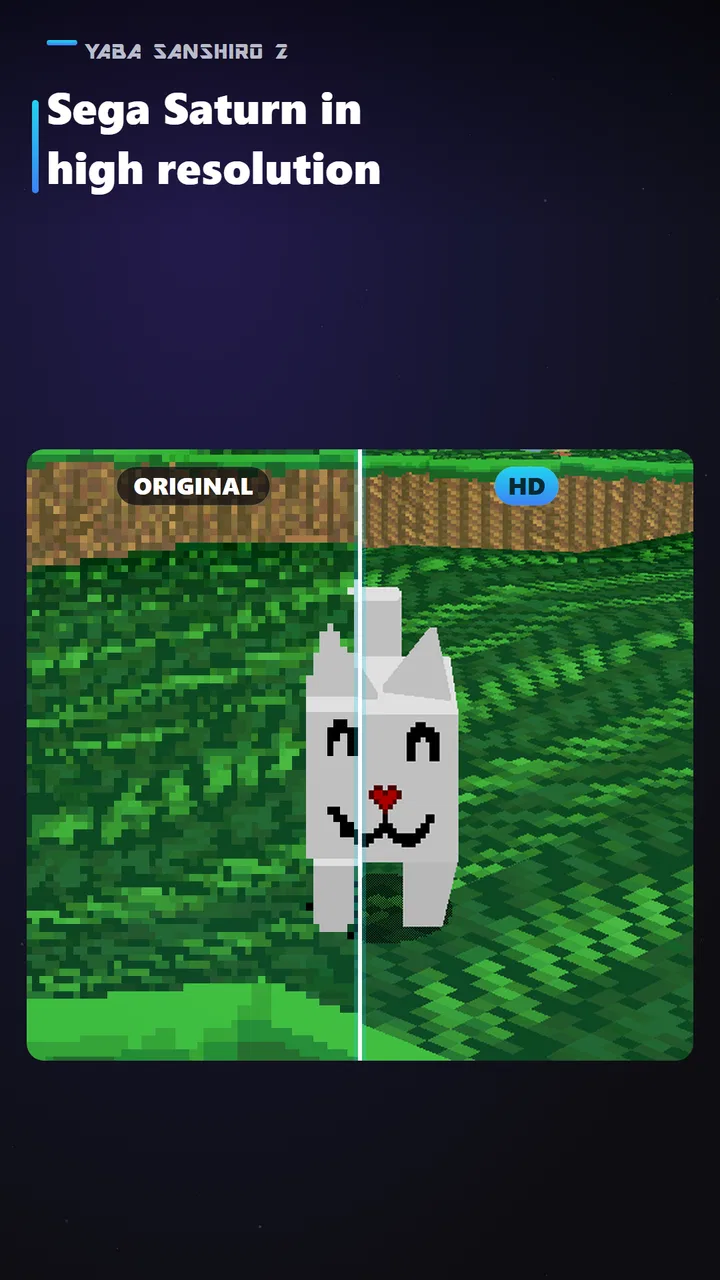
The appeal is straightforward but meaningful. Instead of being tied to an old console and television, I can carry Saturn sessions with me, use HD presentation, keep substantial backup space, and continue through cloud saves. Those features matter more in everyday use than they might sound on paper. A Saturn game can demand a longer session than a quick phone game, so being able to stop without losing my place changes the experience from a novelty into something I can actually fit around a normal day.
From first setup to a usable Saturn library
The early goal here is not to unlock characters, build a profile, or climb a ranking. It is to create a reliable route from the games I legally own to a comfortable playing routine. That makes the opening experience feel different from most arcade releases. The first sense of progress comes from getting the emulator configured, understanding its controls, and confirming that saves and backups behave as expected. Once that foundation is in place, the software becomes almost invisible, which is exactly what I want from this kind of tool.
You May Also Like

 Blood Strike: 2.5 Anniversary
Blood Strike’s Loadouts Turn Every Drop Into a Tactical Gamble
A close look at Blood Strike’s custom loadouts: how fast access to signature weapons reshapes its battle royale rhythm, rewards preparation, and narrows the gap between fights.

 Pandora - Music & Podcasts
Pandora’s Music Is Easy to Start, but Harder to Recover
Pandora’s strength is its low-effort path from a seed to a station. Its weak spot is how much confidence it asks you to place in connection, setup, and quiet recovery.

 8 Ball Pool
 Is Built on Rivalries, Rematches, and Routine
A close look at the rivalries, rematches, shared routines, and unanswered safety questions that turn a quick pool match into a persistent mobile community.

 Samsung Music
’s Quiet Strength Is Playing What You Already Own
Its reach comes less from spectacle than from dependable access to a personal library. That simplicity is both the app’s strongest retention engine and its ceiling.

 AccuWeather: Weather Radar
AccuWeather Review: A Quick, Clear Forecast for Everyday Decisions
For everyday plans, the best forecast is the one you can understand quickly. AccuWeather makes rain timing, radar, and local conditions easy to act on, with a few trade-offs.

 Hill Climb Racing
Why Hill Climb Racing Still Turns Crashes Into One More Run
A tiny car, a bumpy hill and one more upgrade: Hill Climb Racing keeps resurfacing because its simple chaos makes every near-miss feel personal.
More From Our News Desk
View All News


That also means the app is not a good fit for someone expecting an included game collection. YabaSanshiro 2 Pro is the player, not a replacement for owning the software you want to play. A newcomer who simply wants an instant arcade game may find the setup more involved than downloading a conventional title. For a Saturn fan, however, that extra step is part of the value: the reward is access to a personal library in a more flexible format.
The developer, devMiyax, has positioned this as the Pro edition, and the paid entry point reflects that focus. It costs $4.99, while in-app purchases are listed at $0.99 per item. I would judge that purchase differently from a typical free-to-play arcade game. I am not paying to accelerate a fictional progression system; I am paying for a more complete emulation experience. That distinction makes the price easier to understand, although anyone who only wants occasional retro experimentation should think carefully before committing.
Compatibility is another practical part of the first decision. The app requires Android 7.0 or later, so it is not aimed at every older device. On a supported phone, the important question is not just whether a game starts, but whether controls, display quality, saves, and longer sessions feel dependable together. I would begin with one or two games I know well rather than importing an entire library immediately. Familiar titles make it much easier to notice unusual behavior, control problems, or performance quirks.
The HD presentation is most useful when it improves readability without making the image look strangely overprocessed. Saturn visuals can have a distinctive softness and texture, and increasing resolution does not automatically make every game look better. My preference is to treat HD as a clarity option, not a reason to erase the character of the original hardware. If a game looks too clean or too sharp for your taste, spending a little time comparing settings is worthwhile.
What progress looks like when the app is an emulator
Because there is no single campaign shared by the application, progress signals come from the games being played and from the way the emulator preserves them. A completed stage, a better run, a newly reached section, or simply returning to the exact point where I stopped can all feel like meaningful progress. The software’s job is to make those moments survive between sessions instead of turning every interruption into a reset.
Cloud saves are especially valuable for people who move between devices or play in short bursts. I would still treat them as a convenience rather than my only safety net. Before changing devices or reorganizing files, I would make a deliberate local backup as well. Cloud storage can make a library feel secure, but a careful workflow is better than assuming every save situation will sort itself out automatically. This is one of the less obvious strengths of the Pro approach: it encourages me to think of saved progress as something portable and manageable.
The large backup capacity also changes how I use the app. Instead of repeatedly deleting and recreating files to make room, I can maintain a more stable collection of save states or backups. That is useful for games with branching decisions, difficult bosses, or long gaps between play sessions. It also makes experimentation less stressful. I can try a different route or revisit an earlier point without feeling that I have endangered the only copy of my progress.
There is a trade-off, though. More backup space can tempt users into keeping too many versions without a clear naming habit. I recommend using a simple routine: preserve one dependable main save, create a separate backup before a major decision or challenge, and remove obvious duplicates later. That small discipline prevents a long list of nearly identical files from becoming confusing. The app gives the flexibility; the player still needs to organize it.
For a realistic everyday scenario, imagine having twenty minutes before leaving for work. I can open a Saturn game, continue from a cloud-synchronized save, play through one short section, and stop without treating the session as disposable. Later, I can return on the same device or another supported one and pick up from the same point. That is a stronger retention loop than a generic daily reward because it is connected to an actual game I already want to finish.
Challenge and pacing depend on the original game
The difficulty curve is not controlled by YabaSanshiro 2 Pro in the way it would be in a modern arcade game. The emulator does not invent an easier opening, a reward track, or a sequence of unlocks. The challenge belongs to each Saturn title, and that is both the greatest limitation and the most honest part of the experience. If the original game is demanding, its difficulty remains part of the package. If its pacing is uneven, the emulator cannot redesign it without changing what it is.
That makes the app particularly appealing to players who enjoy learning older game design rather than being constantly guided by contemporary progression systems. A Saturn game may ask for patience, repeated attempts, and careful control. The ability to save and resume reduces the friction around real life, but it does not automatically make the underlying challenge fairer. I see that as a useful balance: convenience improves access, while the original goals remain intact.
Save states and backups can also change how I approach difficulty, so I try to use them deliberately. For story progress or a long session, frequent saving is sensible. For a demanding arcade challenge, saving after every tiny success can remove the tension that makes the game satisfying. My preferred compromise is to keep a normal progress save and use an extra backup before a major hurdle. That preserves experimentation without turning every obstacle into a consequence-free exercise.
Controls are where mobile emulation can feel less natural than playing on original hardware or a dedicated controller. Touch input may be acceptable for menus, slower games, or brief testing, but fast Saturn action can expose the limits of a glass screen. If a title depends on precise timing, several buttons, or consistent directional pressure, I would strongly consider using a compatible physical controller. This is not a flaw unique to the app, but it is an important part of deciding whether mobile Saturn play will suit you.
Screen size creates another pacing issue. A television lets me settle into a long session, while a phone encourages shorter bursts and more frequent interruptions. HD output helps the picture remain readable, but it does not change the physical size of the display or the feel of touch controls. I found the app most convincing when used for focused sessions with headphones or a controller, rather than as something to glance at while multitasking.
Why the experience can keep me returning
Retention here comes from unfinished games, personal nostalgia, and the convenience of having a library available in a portable form. There is no need for artificial pressure to return every day. I come back because a saved run is waiting, because I want to test a different approach, or because a familiar title still has a section I never mastered. That is a healthier kind of engagement for me than a system built around constant reminders and disposable rewards.
At the same time, the app will not create motivation if I have no interest in Saturn software. Its retention strength is inherited from the games I bring to it. Someone who downloads it without a clear title in mind may spend more time adjusting settings than playing. I would recommend making a short list of games first, choosing one familiar title for testing, and deciding whether the controls and display feel right before treating the application as a permanent part of a routine.
The paid model also affects retention pressure. Since the core decision happens up front, I do not feel pushed to watch advertising or spend repeatedly just to make normal progress. The listed $0.99 per-item purchases are worth checking before purchase, but the more important point is that this is not presented as a progression economy. For me, that makes returning feel voluntary and game-led. I can play for a few minutes, stop, and come back later without worrying about wasting a timed opportunity.
There is a social and practical side to this as well. Cloud saves make the app more suitable for people who use more than one Android device, while backup space is useful for anyone who likes preserving different points in a game. Neither feature replaces a proper personal archive, but together they reduce the anxiety that often comes with mobile emulation. I am more willing to invest time in a long Saturn game when my progress is not trapped in one fragile session.
Compared with a standard arcade game from the Android store, this is less immediate and much more dependent on personal ownership and setup. Compared with playing on original Saturn hardware, it is far more portable and convenient, with HD presentation and modern save handling, but it cannot reproduce every physical detail of the original setup. Compared with a generic emulator, the Pro edition’s appeal is its emphasis on a polished, high-definition, backup-friendly Saturn experience rather than broad support for unrelated platforms. The best choice depends on whether you want Saturn specifically.
Who should choose it, and who should skip it
I would recommend YabaSanshiro 2 Pro to a Saturn owner who wants to continue games away from the living room, a retro player who values cloud saves, or someone who has several long-form titles and needs dependable backup handling. It is also a good match for players who understand that the original games provide the goals and challenge. The app gives those games a more flexible home without trying to turn them into modern mobile products.
I would skip it if I want a ready-made collection, instant one-minute rounds, or a game designed around touch controls from the beginning. I would also hesitate if my phone runs an older Android release, if I dislike managing personal game files, or if I expect perfect comfort from on-screen controls in every genre. A dedicated console, a physical Saturn setup, or a different platform-specific solution may be better for those priorities.
The age rating is Everyone, which makes the application broadly accessible as software. That does not mean every Saturn game a person uses with it will suit every player, so parents should still consider the individual titles in a library. The app itself is best understood as a way to run and manage classic games, not as a single content package with one consistent tone.
My progression verdict after living with it
YabaSanshiro 2 Pro succeeds because it respects the kind of progress retro players actually care about. It helps me get from setup to play, preserve a difficult run, protect experiments with backups, and return to a game when modern life interrupts. It does not add unlocks, rewards, or a new difficulty curve, and that is not a weakness when the goal is faithful access to Saturn experiences. The pacing remains in the hands of the original games.
The current version is 1.20.37-PRO, and the app has built a solid audience, with an average rating of 4.4 from around 2.2 thousand ratings and more than 50 thousand installs. Those figures suggest a real community of interested users, while the 227 written reviews indicate that people have taken the time to discuss their experiences rather than treating it as an impulse download. I would still judge it on my own device, because emulation comfort depends heavily on the phone, controller, and games involved.
My final recommendation is simple: buy it when you already know why you want Saturn on Android. The combination of HD output, extensive backup space, and cloud saves makes long-term play much more practical than a bare-bones setup. But if you are searching for a self-contained arcade game with built-in goals and unlocks, this is the wrong kind of product. For the right player, its greatest achievement is making progress feel safe, portable, and worth continuing.
FAQs for YabaSanshiro 2 Pro
01What is YabaSanshiro 2 Pro?
YabaSanshiro 2 Pro is a Sega Saturn emulator for Android devices. It allows you to play compatible Saturn games using your own legally obtained game images and BIOS files. The app is designed for users who want improved performance, fewer restrictions, and a more complete experience than the free edition. Because Saturn emulation is demanding, results can vary considerably depending on your phone or tablet.
02Does YabaSanshiro 2 Pro include Sega Saturn games?
No. YabaSanshiro 2 Pro does not include commercial Sega Saturn games, ROMs, or copyrighted BIOS files. You must create or obtain game images from software you legally own and provide the required files yourself. Before downloading, users should understand the copyright rules in their country and avoid downloading unauthorized ROMs from third-party websites, since doing so may be illegal and may also expose the device to unsafe files.
03What devices are compatible with YabaSanshiro 2 Pro?
Compatibility depends mainly on your Android version, processor, graphics hardware, and available storage. More recent devices generally provide smoother emulation, while older or budget phones may experience slowdowns, graphical glitches, audio problems, or crashes. Even powerful hardware may require per-game adjustments. It is also important to check the current Google Play listing for supported Android versions, because requirements and compatibility can change with updates.
04What features does the Pro version offer?
The Pro edition is intended to provide a more complete emulator experience, typically removing limitations or interruptions found in the free version and supporting advanced configuration options. Depending on the release, users may be able to adjust graphics, controls, save states, screen layouts, and performance-related settings. However, features can change between updates, and not every Saturn title will run perfectly, so purchasing the Pro version should not be considered a guarantee of universal compatibility.
05Is YabaSanshiro 2 Pro easy to set up and use?
The basic setup is manageable, but it is not as simple as installing a conventional game. You may need to configure a Saturn BIOS, organize legally created game images, select storage permissions, and customize controls or graphics for individual titles. Touchscreen controls work, although a Bluetooth or USB gamepad can provide a much better experience. Users unfamiliar with emulators should expect some trial and error before achieving stable performance.
Pros
- Accurate Sega Saturn emulation with strong game compatibility.
- Supports save states for convenient progress recovery.
- Offers customizable on-screen controls and external controller support.
- Includes enhanced rendering options for sharper visuals on modern screens.
- Pro version removes advertising for a cleaner gaming experience.
Cons
- Performance can vary significantly between devices and games.
- Requires legally obtained Saturn BIOS files or game images.
- Touch controls may feel awkward for games needing precise inputs.
- Advanced settings can be confusing for users new to emulation.
- Some titles may still show glitches
- audio issues
- or compatibility problems.

YabaSanshiro 2 Pro
Gallery